I have ableton live suite, that comes with max 4 live, that’s not enough, right? Do I need a separate max 9 + rnbo license?
1 Like
yeah, max 4 live does not come with rnbo
(perhaps one day, original gen~ was separate and they later rolled that into Max)
that said… you can use the demo/trial version of max. ( I think indefinitely?) comes with rnbo, and that allows you to export rnbo.
its limitation is you cannot save max/rnbo patches - which would be frustrating if you wanted to do something complex over many sessions.
however, its an ideal way to test it out, see if its interesting to you.
you could then subscribe by the month (cancel any time) , so you need both max/rnbo so about 26 eurors/month 
but, you could get a lot done in month… ( * )
Im not a fan of subs, but I think in many ways this is a reasonable way to use max/rnbo.
I find I’ use it heavily for a month or so, then don’t use it for months on end…
anyways, not here to ‘sell’ Max… as I say, you can use for free too .
( * ) I personally think the rnbo on top of max pricing is a bit ‘steep’…both perm license and sub - but I think it’s primiarly aimed at developers, some of who will sell it on, and so recoup cost?
Max with rnbo it’s on sale currently if anyone is on the fence. 50% off but still a decent chunk of cash.
1 Like
yeah… Id only advise buying if you know you are using it for a lot of stuff…
( 350 euros is still a tad heavy , imho)
pity they didn’t discount the subscriptions, I think those are more affordable / useful for most people - as its not the kind of thing you use every day/week.( *)
esp. as the trial allows you to edit etc just not save.
( * ) you can run max/rmbo patches without a sub.. so you only need when actively developing / changing.
Thank you so much for driving this to reality @TheTechnobear
Looking back to the earlier thread Any Native Plugin Development for MM Going On? - Plugins - MetaModule Forum .. I hope this is only the beginning of a rich legacy!
1 Like
you’re welcome, hope you give it a go - here to help if you have any issues.
a couple of tips:
a) docs vs video…
the docs contained in the repo, will always be more up to date than the video.
the video is a good overview, but things change.
in particular, if users have issues, then I’ll often go into the docs and add clarifications, but Im unlikely to re-shoot a new video 
b) start simple !
my experience with this, and similar projects is - you can get a LOT of value by doing something super simple ! take a single simple RNBO object, and create a patch with it.
example:
create a filter based on butterworth~, it only has an single audio input and a parameter for frequency - so one inlet, one parameter. get that working on vcv/MM
probably THE best thing about Max is every object has an example patch and help, its fantastic if you are new to DSP.
it can be really satisfying, just getting this initially step working, creating something of your own !!
2 Likes
just testing the limits… 24 knobs/ins/outs seems to be the max for a 40hp panel (made a custom 40hp panel via inkscape, added to res folder. also created a png one for the assets folder).. not that anyone would ever need that much, but i guess never know!
adding any more knobs, the outs start getting cut off/pushed out of view in vcv - so not accessible at that point.
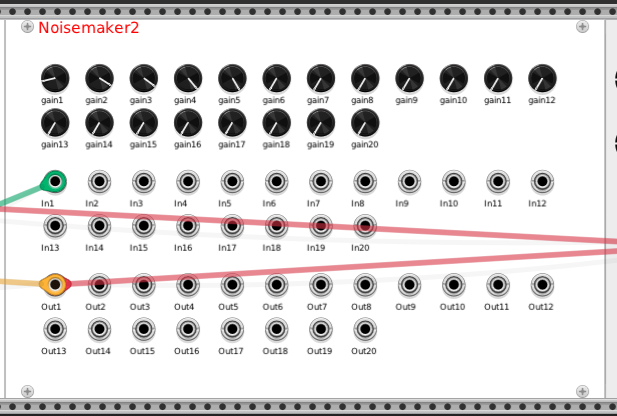
im assuming that 40hp would fit ok on the mm screen as 20hp seems to take up about half the width (don’t have my mm here to test).
very curious about how this is done! welcome the knowledge whenever you get around to sharing about it. i suppose for now it’s easy enough to at least change the white background of all the .svg and .png from what to dark grey or something.
there are some comments in the (generated) code that explain the process.
so the key to understanding is that the generator generates your own ‘copy’ of the code that you can then hand modify, without worrying about breaking things.
however, bare in mind, if you ‘regenerate’ they you will overwrite that code !
so you have to be a bit ‘careful’
theres a couple of different ‘levels’ of customisation, that require more / less skills
a) replace panel / alter spacing etc.
you can use any custom panel you want , thats why it asks which panel to use.
you need to look at the vcv and mm guide about how to ensure you end up with compatible panels.
also if you look at the code, you can see with a few constants you can tweak things like spacing.
a bit more in depth look, you could alter how the code places components.
e.g. put inputs all at the top.
also, the order you place parameters / IO in a rnbo patch will alter the order they appear on a panel
b) use VCV to create a custom panel with custom layout
you need to have some familiarity with how generally you create new module panels in vcv, this is detailed very clearly in the VCV development guide.
(no point in me repeating that, as its done really well)
basically, vcv has its own ‘generator’ that can design panels from svg files.
so you can layout using that, and then just substitute that code into the RNBO generated code.
then just ‘undefine’ (i.e. comment out) GENERIC_UI, and use the vcv generated code instead.
the ‘trick’ here is the parameter, and ports (input and output) are referred to as numeric ids… both in rnbo and vcv, and you need to ensure that this align correctly.
i.e. the first parameter in your rnbo patch, matches the first parameter in your svg.
in practice this is easier that it seems… as you can just reorder the ids within the vcv generated code, if you get it wrongs.
this whole process is actually very simple, once you start looking at the code generated by the vcv generator and seeing how it might slot into the rnbo generated code.
c) create your own UI
this is really a variation on (b) but rather than use the vcv generator you can just write your own code.
often Id do a hybrid of b and c… so I start by creating the panel with the vcv generator, to place simple controls etc, then I start modifying it to add my own custom controls etc.
you’d need to do this for if you wanted to do custom drawing, e.g. writing an oscilliscope - but this is getting a bit more advanced
one thing, I’ll repeat what I said before, as it very important (and easy to loose work if you forget)
generators create code and overwrite the existing code (I think with a warning iirc)
so once you start modifying the generated code, if you change a panel or rnbo and need to re-generate you need to be very careful you dont overwrite what youve done.
theres a few approaches to this, but the easiest way is…
once you have started modifying the generated code.
if you need to re-generate, then re-generate into a ‘new temporary module’, then basically cut n’ past the required change codes between the two modules.
then delete the temporary module.
anyway, just give it a go… particularly (b).
its a good thing to do, as you’ll learn more about vcv development generally.
once you have used the vcv tools and it works, and you understand it.
(the more you already know about this, the easier this step’ll be)
it’ll be obvious how to combine with what Ive done, and you’ll see the power and flexiblity of the approach Ive taken
yeah, sure.. but how practical is a module with this many parameter and IO on a mm. - it’d be a nightmare to patch it
honestly, at this point, if I was designing the module Id be reconsidering my design.
(as you were if you were a eurorack design - as pots / jacks cost $ ;))
often , less is more.
This is one of the really cool things about the designs from Emile of mutable, She really knew how to design modules in such a way that are powerful but compact, and also easy to understand.
I think this is an important step with virtual modules too, for UX… even though the real world cost/physical constraints don’t exist.
Its something Ive noticed in many fields, (including programming),
when you make things easier to do, often people seem to think/design less.
i.e. constraints tend to make you focus on whats important, they also tend to make you iterate to improve - rather than just implementing your first idea.
right, that would be a monster module - there are certainly plenty of those already in the vcv library! some people might want that kind of flex. but regardless of personal preferences, i think it’s interesting to note what is possible
at this point, i’m generally interested in making things look a bitter darker on the screen on stage. the mm screen is too small to show off anything really anyway, but the white paneling is intense (but great for template purposes for sure imo). changing the background color of the panels is no problem. i am fine with the space, but i am curious which file must one edit to simply alter the color of the fonts?
yes, but the vcv modules are, generally, designed for the desktop - not small lcd screens. also parameters are altered by a mouse directly, you dont have to hunt thru dozens or parameters in a menu
fundamentally, the background colour comes from the svg file,
which you’ll find in ./VcvModules/res
however, for the MM these need to be converted into png files, and stored in assets
this is done with a script file ./metamodule-plugin-sdk/scripts/SvgToPng.py as detailed in the MM dev guide.
note: always use this script, don’t just convert in Inkscape.
my stuff doesn’t hard code these, so if you dump a svg into ./VcvModules/res and a corresponding png into assets. you can just use this when you run the generation.
also if you look at previously generated code, you’ll see the file reference to the panel svg file, so it easy enough to change. the mm code should then automatically pick up the relevant png file.
howev
yea but with some sequencers, and other deep modules one just can’t get around having to param dive on the mm. nature of those module beasts
awesome, really good to know there!
and i get all that about background color. but i’m actually curious about adjusting “font” colors. if the way to adjust font colors is overly arduous, can certainly live w them as is 
yup, thats why I don’t use them
I only use generative-like sequencers on the MM, to keep the parameters number down. if I want hands-on sequencing, I use my Hapax
thats done in the code, since the ‘labels’ are generated from the RNBO patch.
you’ll see each of paramters, inputs and output has code with addLabel, the last parameter is nvgRGB(0x00, 0x00, 0x00) , this is red /green/ blue mix.
so 0 on all = black, 0xFF (255) on all = white. Im sure you’ll find online apps that’ll give you values to find what you want.
1 Like
i’m noticing that param~ ones are getting sorted out of order, to the far right. is this expected behavior (i had to start using these param~ + snapshot ones due to some weird bug, without that setup using regular param, when turning the knob quickly in vcv, caused the module to stop working)?
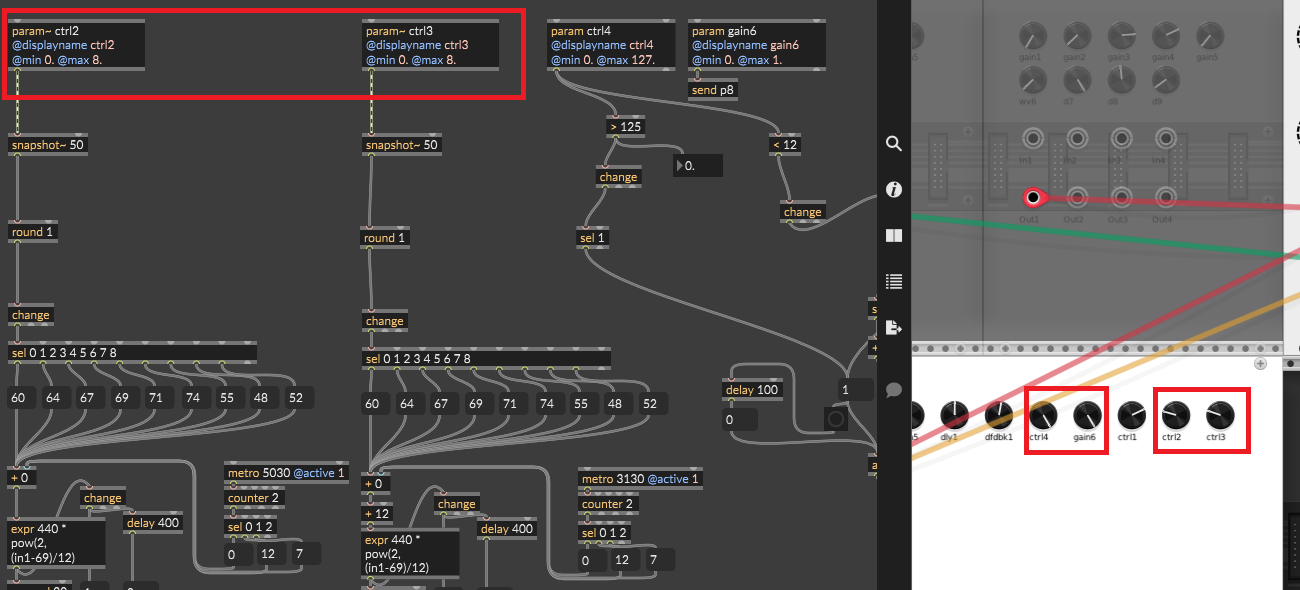
also i noticed some empty comments left in your starter template. are those needed for any reason (edit: having removed these and built a few times, not noticing any problems so am assuming ok to delete these)?
Ooh, Cycling 74, now offer RNBO as a monthly subscription !
so you can get Max ($13) + Rnbo ($10) = $23/month.
seem to me, rnbo is a bit pricey
but remember, you only need rnbo whilst actively developing,
so, you can just turn it on/off as needed, and a month would be enough for a few projects!
(you do not need active sub for using /building your generated plugins)
note: not sure when this changed, as before rnbo was a buy once option, even if you had a max monthly sub.
I’ve seen the subscription option since the beginning. Still seems quite expensive to me all considered.
really? perhaps I was mistaken, I did buy it very early on.
expensive - yes, and no… I agree, its odd that its nearly the same price as max.
however, its a different ‘value’ proposition, as you only need it to create patches, you don’t need it for runtime (if you use the generator, which I think is the main use-case).
I guess if you want something free, use PD + Heavy, but its not comparable in my book. ( * )
esp, for non-coders, Max/RNBO ui, debugging and documentation is top quality, worth every penny in my book.
that said, all comes down to how much you use it, and invest time into learning it…
I’ve no issue spending $ on good tools if use them a lot 
(*) I was a big fan of PD, after using it alot for Orac/Organelle.
EDIT: ok, just checked… I think i see what caused my confusion…
RNBO has to match your existing max license (**) , so I was likely logged in, and because I have a permanent max licence, I would have only been offered a permanent license for RNBO.
today, i was not logged in, so it offered all options.
(**)
permanent max → permanent rnbo
yearly sub max → yearly sub rnbo
monthly sub max → monthly sub rnbo
probably if I was doing it again, Id go monthly, as I go thru phases of using it alot for a month or so, then not using it for a long time 
1 Like
I know, 'm the current Heavy maintainer
(working on MetaModule soon!)
3 Likes