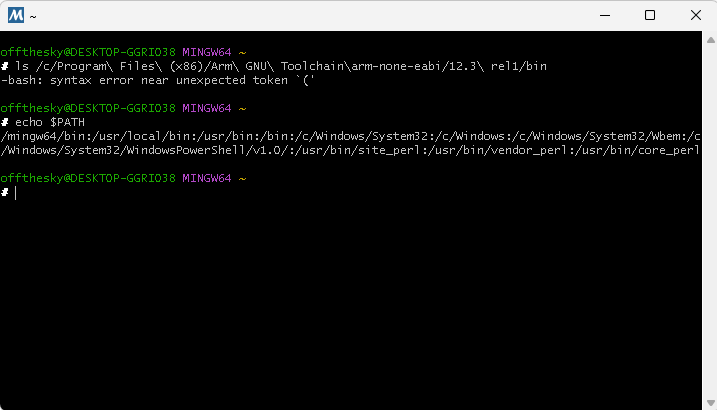
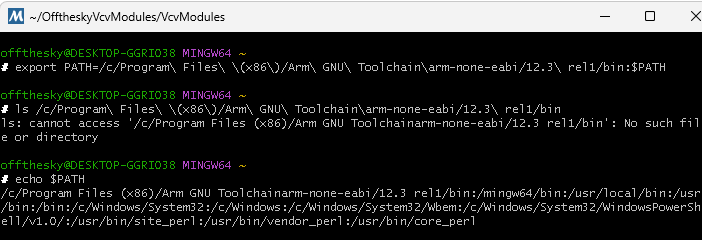
i setup the path to the arm install as stated in the setup instruction:
export PATH=/c/Program\ Files\ (x86)/Arm\ GNU\ Toolchain\arm-none-eabi/12.3\ rel1/bin:$PATH
when i paste that line into the shell and hit enter, it doesn’t spit out any info, is that normal?
by export you mean - export from rnbo? and by 'open the session ’ you mean open “MSYS2 MINGW64 Shell”?
so after updating my fork i removed the module as you advised, then i followed steps 3-5 in the create module section. instead of ‘make install’ i did a ‘make dist’ (as you had suggested earlier, just to try that out). i assume that wouldn’t have any effect on the build for metamodule step?
when i ‘copy as path’ one of the exe’s inside that bin folder, this is the path windows gives me:
"C:\Program Files (x86)\Arm GNU Toolchain arm-none-eabi\12.3 rel1\bin" - that seems to match up with your export path?
hmm, and after the export you still get the same error from cmake?
once the export is on the path, you should be able to execute any of the files in that bin directory. which is basically what cmake was complaining about.
its odd that ls command is is not working, but Id need to try that on a windows machine to see if there is something else odd going on when I next can grab it.
but the export command was what I used to get the build working - when I had access to that machine, so should be fine.
ah, that makes sense… I must have messed it up when I copied from the PC into the email I sent myself - I’ll fix the doc.
(its bizarre as on the Mac they dont use spaces, which makes things easier its just … /Applications/ArmGnuToolchain/12.3rel1/arm-none-eabi , not sure why they had to complicate it on windows )
a lot of things on windows don’t make sense so maybe they just wanted to add to that haha. at any rate, the .mmplugin is works/sounds great on the mm! super cool! ty for all you help on this
edit: is there an easy way to tell when you push updates to your repo? or will you be posting here whenever you push major changes that require us to fetch?
but you can just run, git fetch and merge (as details above) , and it tells you what files have changed. so you can just do that regularly. if nothing has updated, it doesn’t do anything.
actually you can do this fetch merge in one command
git pull upstream
the thing to watch out for is, changes to files in template directory.
if those change you may want to regenerate your module(s)
obviously if it just docs, then you don’t need to do anything.
there is a desktop app for github, but its probably more confusing that just using the few commands you need. I dont use it.
Re: the json error, I found it works if you use the MSYS Makefiles generator when using msys. So:
cmake --fresh -B build -G "MSYS Makefiles"
Then it works. The problem is the two types of paths on msys/mingw/windows (C:/... vs /c/...). Using MSYS Makefiles “just works”. I’m updating the sdk README to include this.
BTW I played around with trying to convert the path from within cmake, but couldn’t get it to work without lots and lots of checks and running external programs. Detecting which type of path the currently running shell will want is not simple… I suppose that’s why there’s a cmake generator to handle all these issues.
check.py checks that you have installed ARM sdk correctly (default location)
check.py checks ARM sdk is on your path
check.py is now more specific about any issue with ARM SDK, and next step
check.py asks user if they would like to add ARM sdk to their patch in .bashrc (recommended)
there are no changes to the code generation etc, as this was all correct.
but Id strongly recommend windows user update, to get the new check.py script.
@offthesky , once you have done the update,
run ‘python3 scripts/check.py’
then you can get it to add arm sdk to bashrc, so you don’t need to do it ever again.
note: as per instructions you’ll need to restart MSYS2 WING64 terminal for it to take effect.
did the update then ran python3 scripts/check.py and built the mmplugin. am not able to test it out yet, but everything in the terminal looked good!
question: in your video you mentioned adding a – -j 8 to the end of the metamodule build script. that obviously speeds the build way up. is there any reason why we wouldn’t want to just use that all the time?
you could use 8 all the time if you wanted to - it wont break anything.
but. 8 is the number of cores thats its going to use on your machine, for some 4 might be better, others 16 - depends on number (and type) of cores you have.
also, only makes a big difference on the first build, when a lot of files are compiled, subsequent builds are fast enough on one core.
importantly, I didn’t supply a build script, rather just explain how to compile…
(cmake / make are standard build tools)
so, whilst explaining / documenting them, I didn’t want to over complicate by adding ‘parameters’. that are not actually required. it might confuse some.
(esp. the double dash, then single dash)
given most are going to not be doing this frequently its a non issue to just keep it simple.
as an aside, I’ve already done this before for the Percussa SSP , many years ago.
so I learn’t a little on what trips people up - and how frustrating that is for them.
it’s SO easy as a developer to assume everyone knows x, y, z - “that its obvious”
you have to keep it really super simple, to make it approachable for as many as possible.
good to know! and also for the different use cases. i am setting up hotkeys to quickly spit out the commonly used lines so might as well just keep in the “-- -j 8” bit as i’ve plenty cores to go around
max user here, been waiting for something like this along with an easier rnbo to daisy toolkit before getting rnbo. hoping there’s a black friday sale coming up : ) Thanks a bunch for this!
My impression is that they are hoping for a Black Friday sale on RNBO. So am I, because I have a couple of projects I’d like to pursue using your free fantastic framework.
hi yes, feel free to pay me : ) no usually around this time of year Cycling has a sale and I’ve been holding off on RNBO each year but your new kit will be the reason I finally get it. I think if anyones interested their sale usually starts around actual Black Friday and they’ve had around 30% discounts in the past. PS Cycling should be paying you! Thanks again!
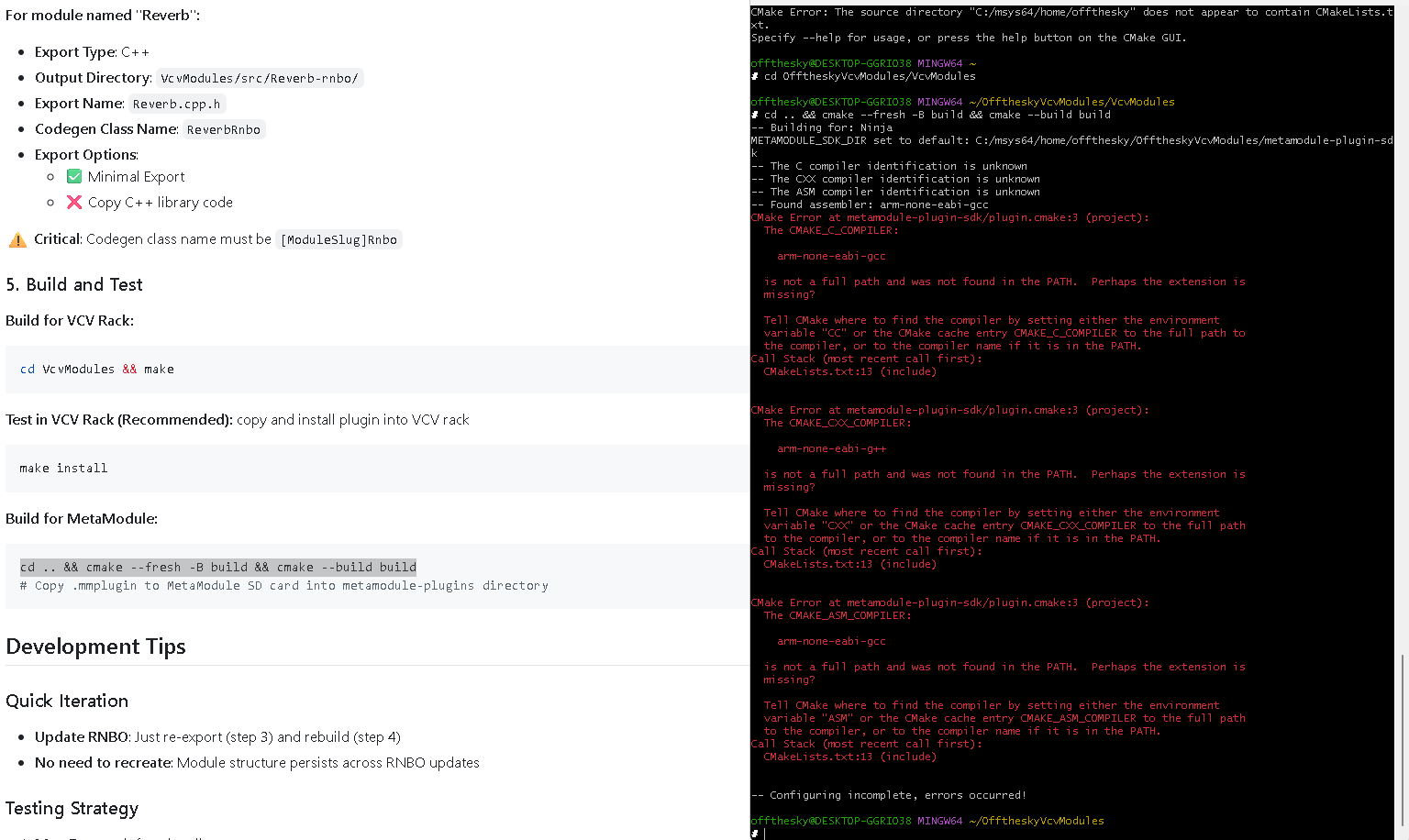


 - I’ll fix the doc.
 )
)