Watch the video for this patch on YouTube here!
NOTE For this patch to work you must download the track below and place it in the same directory as your MetaModule patch:
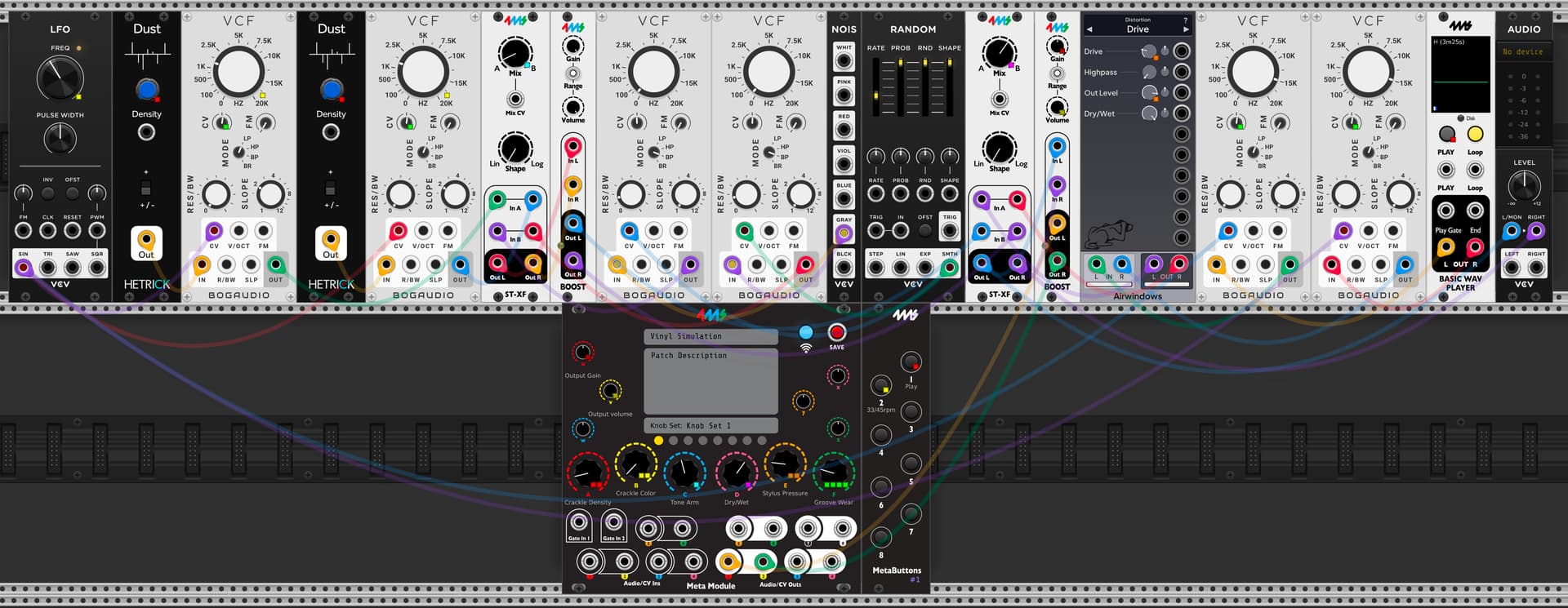
External Audio Routing:
-Main audio outputs on channels 1 and 2
Internal Audio Routing:
-Two dust modules are fed into two lowpass filters
-The output of the filters is fed into a stereo crossfader
-A gray noise signal is fed into two lowpass filters
-The outputs of the lowpass filters are fed into the same crossfader. This crossfader balances the volume between the dust and tone arm.
-The output of this crossfaded noise is ran into a boost module to crank the gain up to a usable level
-After the boost it is sent to a separate crossfader as the Dry/Wet control for the patch
-A Basic Wav Player is fed into two lowpass filters
-The output of the lowpass filters is fed into a distortion
-The distorted output goes to the Dry/Wet crossfader
Internal CV Routing:
-A smooth random LFO modulates the cutoff of the tone arm filter, with inverted phase for each filter
-A steady sine wave LFO controls the cutoff of the noise filter and the program material filter
MetaModule Knob Mapping:
A - Crackle density (dust density)
B - Crackle color (filter cutoff)
C - Tone arm (crossfade for dust/tone arm)
D - Dry/Wet (global effect dry/wet)
E - Stylus pressure (program material distortion)
F - Groove wear (LFO depth)
U - Output gain
V - Output volume
Button 1 - Play
Button 2 - 33 / 45RPM select
Vinyl Simulation .vcv (3.5 KB)
Vinyl Simulation.yml (12.7 KB)