NOTE For this patch to work you must download the attached WAV file and place it in the same root directory as your patch:
External Audio Routing:
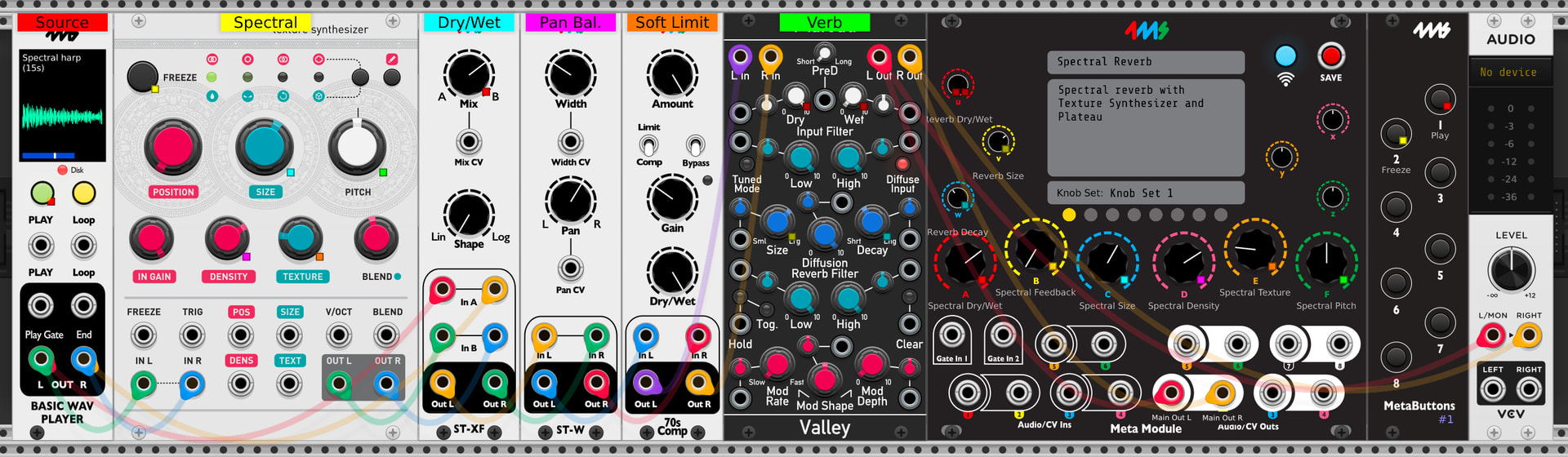
-Main outputs on channels 1 and 2
Internal Audio Routing:
-The output of the Basic Wav Player is fed into the Texture Synthesizer
-The Texture Synthesizer is fed into a Stereo Crossfader as a dry/wet control
-The output of the Stereo Crossfader is fed into a Stereo Width module for taming the stereo image
-A 70s Comp is used to tame the dynamics of the sound
-The 70s comp is fed into a Reverb
MetaModule Knob Mapping:
A - Spectral Dry/Wet
B - Spectral Feedback
C - Spectral Size
D - Spectral Density
E - Spectral Texture
F - Spectral Pitch
U - Reverb Dry/Wet
V - Reverb Size
W - Reverb Decay
I tried to rebuild the patch on the metamodule itself to find the problem. I think I found something. First the module on Metamodule most close to the Texture Synthesizer is called Granulation, both a Clouds version I suppose. In the options of the granulation module Kira4ms switched to Spectral Madness as alternate mode. This triggers the patch load > 99% message on my metamodule.
This patch runs at 48khz/16 block size on my machine. If you have “allow patch to override” block size and sample rate settings it should automatically switch to these settings. Let me know if you still have issues
Well, so far it doesn’t on mine.. If I just pick the Clouds (aka Granulation) module separately as a new patch the system starts to panic as soon as i turn it to Spectral Madness. It appearently doesn’t on the systems of at least three other users. In the meantime I’m learning a lot by trying to get a better view of what everything is doing. So that’s a plus.
EnOsc-Step-Seq, EnOsc Poly4, Ensemble Wash, Midi-Poly4, Wander Voices and Westcoast FM Madness won’t run. These 6 factory patches are giving the same message; patch load > 99%
I can’t replicate that issue on my end. Which firmware version are you using? Did you check your prefs in settings and click “allow patch to override” for both sample rate and block size?
I installed the newer firmware and the plugins. Aren’t the modules with the problems I had not in the plugins download but in the firmware? Anyhow, Progress! The factory patches work and if I turn off the overide settings and change Sample Rate to 32kHz and Buffer Size to 256 Spectral Reverb works as well!
So.. now I get the hang of it playing around with Sample Rate and Buffer Size. Thanks a lot for your patience:)! Still I’m curious under what conditions a patch like this does run at 48/16? In others words appearently there a way to optimize MM. Asking just to get a more clear view on what is going on.
Use our module finder tool to get an estimated CPU draw for each module. If you’re at 48/16 and a patch overruns, use it as a reference to see what’s CPU intensive. If you want to debug your patch in metamodule there’s an option inside tools called “bypass.” This is the same bypass feature as VCV rack, where the module stays patched and mapped but it shuts off it’s CPU draw.
Just read the ‘making of’ thread on the forum the other day:) The granulation module looks pretty decent in that list.. but, as I understand now, throwing Fast Fourrier Transform (mode Spectral Madness in the options section) at a CPU is no small potatoes. What I miss is the option in MM to save the preferred Sample Rate and Buffersize. Then the function ‘allow patch to override’ would make more sense te me. It doesn’t automatically store it when saving the Spectral Reverb patch with a suitable Sample rate and buffer size . I found it in VCV but not on the MM itself.
I found the trick, save the patch on the usb stick and edit the .yml on the computer with a text editor. The sample rate/buffersize info is at the bottom of the file.
you can do that in metamodule per patch and save the patch file internally. Click on the large “I” icon, change the settings, exit that menu and then click the floppy disk icon to save. Alternatively, if you right click on metamodule in VCV rack you can adjust it there.