I’ve been having this issue for a couple months now. Tried a full factory reset and SD card reformat…still didn’t fix the issue. Plugins and settings have to be manually reloaded every time…grrrr..
@danngreen any suggestions on how to prevent this issue?
Ok, that’s strange. A factory reset will re-format the internal drive.
See if you can do this, it might help illuminate the issue:
Set some plugins to preload, exit the Plugins tab (remember you have to go back to the Main Menu in order to save the plugin preload settings), and then reboot. Go to the Plugins page, and manually load one of the plugins that was supposed to preload. Then click on the plugin’s name again and see if the “Preload” checkbox is set or not. If it’s not set, then the settings file is not loading.
If it is set, then probably the SD or USB drive is not mounting fast enough after startup.
As for the settings not reloading, you mean things like the audio sample rate/blocksize, and display settings (gear icon on Module View and Patch View pages)?
Hey @danngreen did this get solved? I am having the same issue after updating to the latest firmware. (v2.1.3)
The plugins do not load at start up, None of my settings are saving inc Sample rate, knob behaviour, auto load project ect.
It is loading up the sloth drone patch at start up.
I have factory reset and formatted the sd card with no change. I have also tried different SD cards with no luck.
I was able to make this happen a few times, so we added a short delay during startup in case there’s a lot of activity (drives being mounted, MIDI devices communicating, etc).
We also added a feature in v2.1.3 that might help us.
Go to Settings > System and click on Backup Settings To File.
Insert a USB or SD Card and then click the button for where you want to save the backup file. Take note if an error pops up when you do that. If no errors, then on the SD Card or USB drive there will be a file called “settings.yml”.
Send us the file (it’s small, you can attach it here or email it to us).
Also copy it to your computer as a backup.
Next, download this known-working settings file here: settings.yml (1.4 KB)
then copy the file onto the SD Card or USB drive, overwriting the "settings.yml"file that you were just using.
Now go back to Settings > System and click Load Settings from File.
Choose the volume, and pay attention if any errors pop up.
This settings file has no plugins pre-loading, so go ahead and load a few plugins, then click “Pre-load current”. Exit out of the settings and reboot again and see if it worked.
One thing to try is if there’s a MIDI controller attached when you power on, then try disconnecting the MIDI device until the unit is fully booted.
Also – regarding Startup Patch, I’m not sure everyone has seen this but we added it to the File Menu. So to make a certain patch the startup patch: open up the patch, then click the File menu icon, then check “Startup Patch”.
settings.yml (1.4 KB) This is my settings.yml file before downloading an using the one in your message. This was not saving any modules or settings.
I have used the working settings.yml file and managed to get a few plugins to run and the settings seem to be working, however the Nano Modules plugin is not loading at start up and when I load a patch with a Nano Modules module it asks if i would like to load it but says module not found. I have to go back in to the plugins settings and load it again for it to work.
This is my settings after getting the modules to load. settings.yml (1.7 KB)
Hey @danngreen - I am also running into this issue on the production 2.1.3 firmware, with multiple SD cards and after factory resetting my metamodule.
I’m simply adding all the plugins from the all-plugins zip and loading all, but every time the plugins fail to load on startup, even if I have backed up the settings to SD card
Settings are here:
Upon saving this, I cannot load it again - it says failed to load
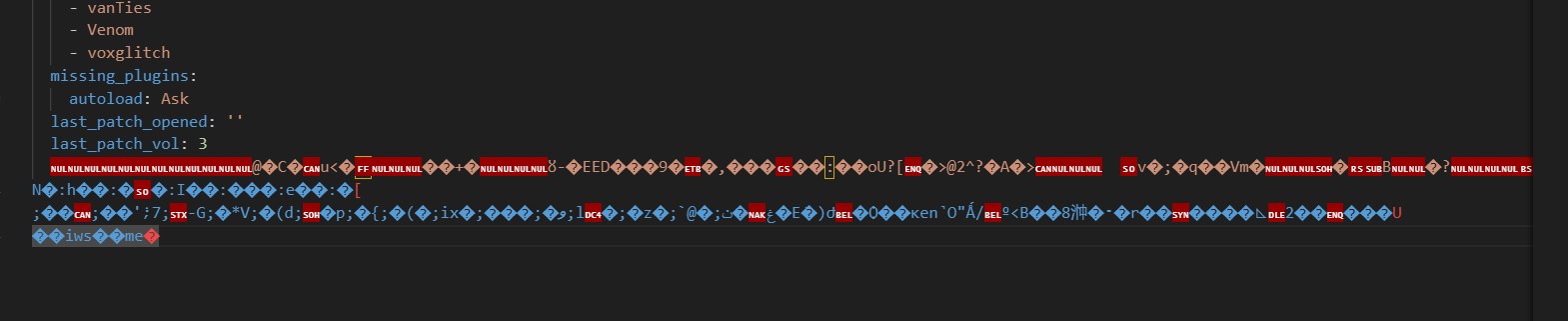
There is also a bunch of corrupted gibberish at the end of the yml that doesn’t show in gist, but it does in an IDE
third update:
I’ve found that so long as I only add 38 plugins, it can load. Adding any plugin past 38 instantly causes the settings.yml to fail to load, and subsequently not load anything on startup.
I was having similar problems. The NANOmodules fixed the loading issue as described above. However, loading more than 36 plugin sets causes the Meta to revert to factory defaults erasing my preferences for startup patch and presentation of meters. Interestingly, I was using Dan’s backup settings file trick to see what happens. The setting file remains intact and all works when the number of plugin sets is kept at 36 and below. However, when the extra 20 lines are added to the settings file from the additional plugins loaded, the end of the file is corrupted with garbage characters just after the last_patch_vol label and you lose the last about 20 lines of the settings file. Hope this makes sense.
Sorry to report that this still seems to be happening on 2.1.4. Fresh install, just downloaded the full plugins.zip from the site, I can load them all, set them to preload, but when restarting the unit none of them load.
Doh… does it matter if the plugins are on USB or SD Card?
I’ve seen an issue where a USB drive takes a while to load and so the preloader can’t load plugins from it before it times out.