There are some new features available for plugins in SDK v2.4.0:
VCV Expander support
Support for expanders in VCV-ported modules. I don’t have immediate plans for supporting this in native modules, but it’ll come eventually. The SDK didn’t have to change much, except in one place we needed to set a pointer when a VCV module is created. Thanks to @gabrielroth
Context Menus for native modules
Native modules can have context menus (thanks to @gabrielroth). See metamodule-plugin-sdk/docs/context-menus.md at main · 4ms/metamodule-plugin-sdk · GitHub
Console upgrades
I highly recommend attaching your MetaModule to your computer with a USB cable and opening a console window on your computer to watch for warnings and debug messages. You can make your plugin printf() useful information for debugging, too.
See here: metamodule-plugin-sdk/docs/developer-console.md at main · 4ms/metamodule-plugin-sdk · GitHub
Also, if you haven’t been using Developer Drive, it’s a big time saver. I recommend turning on Developer Mode and transferring your plugin via the USB cable instead of SD card or USB drive.
Groups, Display Names, and Display Order
The big new thing for developers is element groups, names, and ordering. @gabrielroth implemented groups in native modules a while back, and I played around with it and ended up moving the declarations from code to the plugin-mm.json file, so that it could work with VCV modules and be part of the v2.x SDK without needing to wait for v3.x.
The full docs are here: metamodule-plugin-sdk/docs/element-groups.md at main · 4ms/metamodule-plugin-sdk · GitHub
Groups
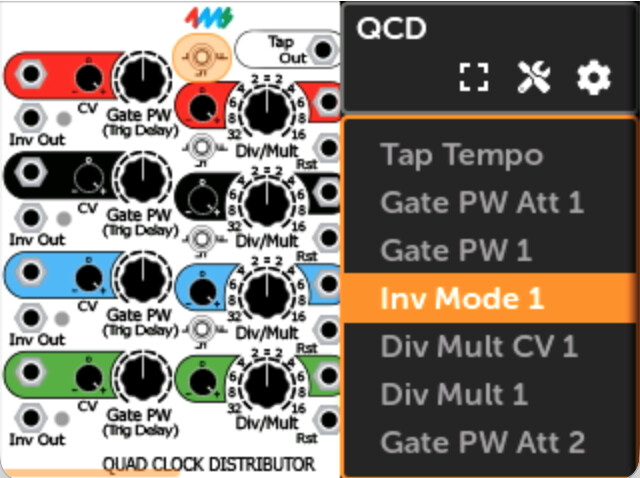
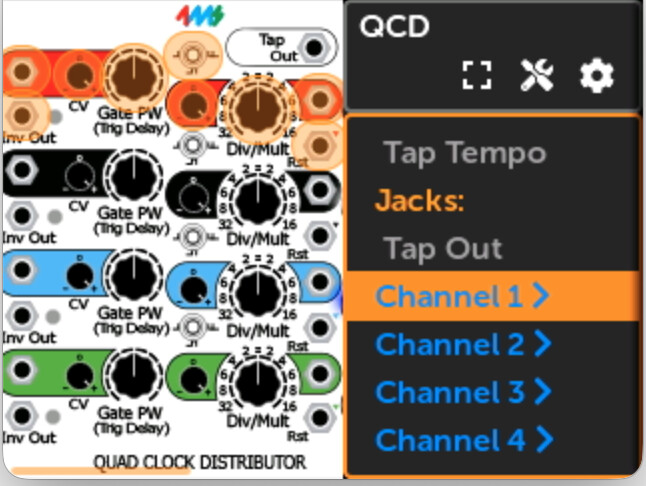
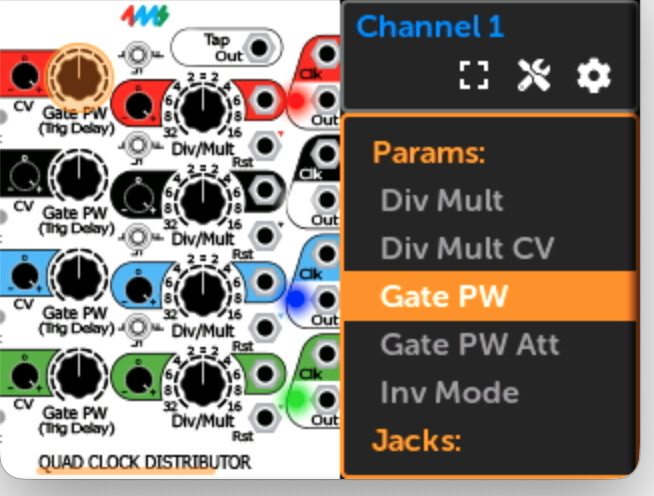
Groups make it easier to for users to navigate multi-channel modules, or modules with distinct sub-sections. Instead of seeing a long list of each param on each channel, they see “Channel 1>” and “Channel 2>” etc so they can find what they want without lots of scrolling.
Before (the list was 46 items long):
After: (now it has 6 items)
Clicking on a group displays just its members:
To implement groups on your module, you need to add a groups field to the MetaModuleIncludedModules section of your plugin’s plugin-mm.json file. Like this:
	"MetaModuleIncludedModules": [
		{
			"slug": "SimpleVoice",
			"name": "Simple Voice",
			"groups": {
				"Filter": ["Cutoff", "Resonance", "Cutoff CV"],
				"Envelope": ["Attack", "Decay", "Sustain", "Release"]
			}
		},
		{
			"slug": "gain4",
			"name": "Quad Gain",
			"groups": {
				"Channel 1": ["Gain 1", "Polarity 1", "In 1", "Out 1"],
				"Channel 2": ["Gain 2", "Polarity 2", "In 2", "Out 2"],
				"Channel 3": ["Gain 3", "Polarity 3", "In 3", "Out 3"],
				"Channel 4": ["Gain 4", "Polarity 4", "In 4", "Out 4"]
			}
		},
// more modules...
The strings “Cutoff” and “Gain 1”, etc are the actual display names of the controls or jacks, as you see them on the Module View page when run on the MetaModule. So it works even if the module creates the names dynamically. But, if you make a typo you won’t see it until you open the module in ModuleView and an error will be printed to the console. We have a script you can run to catch this, but it requires the firmware repo on your computer. See the docs.
You also can specify names using the enum value, which is more robust because you get an error right away. But it won’t work if you do fancy things with enums in your module. For every plugin I checked, using the enum would work fine, but it’s not 100% foolproof.
Using this looks like this:
	"groups": {
		"Filter": ["CUTOFF_PARAM", "RESO_PARAM", "CUTOFF_CV_INPUT"]
	},
    "class": "AwesomeFilterModule"
where your module code contains something like
class AwesomeFilterModule : rack::Module {
    enum ParamIds { CUTOFF_PARAM, RESO_PARAM, ..., NUM_PARAMS };
    enum InputIds { CUTOFF_CV_INPUT, ..., NUM_INPUTS };
The debug build of the plugin’s binary object files are scanned to find those enum names. See the docs for details and edge cases.
Names
You can also give custom names to elements. Sometimes this is nice just to make the words fit on the small MM screen (“Saw Out” instead of “Sawtooth Output”). It also is useful in cases where the VCV version has extra text on it as a sort of tooltip (“CV Input -5V min to +5V max”)
See the docs
Display Order
You can also specify the order that elements are displayed. Previously, params and jacks appeared in the enum order of the VCV module, which is often not a logical order.
See the docs