I’m curious as to the amount of power that the USB port provides for external midi controllers. How does the power supplied by the USB port affect the power requirements of the Meta Module. Is the power for the USB port pulled from the 5V rail? I’m considering several different options for where I will mount the Meta Module (including the potentially a 4ms Pod) hence my question on power requirements. Thanks.
USB power is up to 500mA, which is the standard amount. Internally, it generates that power with an efficient DC-DC converter from the 12V rail. This is much better than using the 5V rail since 500mA on a 5V rail can push the limits of some systems.
For example, with no USB connected the Metamodule uses around 250mA. Connecting my BeatStep Pro brings it up to 320mA. If we had used the 5V rail this would require around 300-350mA on the +5V, but instead it only uses an additional 70mA on the +12V.
4 Likes
I have an Arturia 25 key Minilab 3. Plugging it into USB port always causes the module to freeze. I suspect it’s the power draw. It does not seem to have a separate power cable. After I locate a powered hub I’ll update here. I’m also going to try some controllers that have separate power cables.
That’s odd, it shouldn’t be a power issue. I haven’t tested the mk3 but the mkII “mini hyrbrid” works great.
Does it crash if you make a new patch (no modules) and then plug it in? That way you can rule out some MIDI issue. The firmware update I’m working on now addresses a lot of MIDI issues, including adding the ability to map MIDI to jacks without using VCV.
It probably won’t work with the hub, though. I plan to add support for hubs but for now you have connect devices directly.
1 Like
I can report the same problem with Intech MIDI controllers. Someone reported the same problem with Intech controllers on ModWiggler too. If I connect the controller then switch on the MM, it doesn’t boot up, I just get snow on the screen. If I switch on the MM first, then connect the Intech, the module freezes - regardless of whether there is a new empty patch there or not. So it looks as if some MIDI controllers are causing a problem. My Novation Launch Control works fine though.
By the way, this is a fantastic module, with an outstanding design - many thanks to 4ms for all your hard work!
Hmm, ok thanks. I will order those MIDI controllers and see what I can figure out
Ok, I got a MiniLab 3 and I can reproduce the issue. It’s not power-related, it’s just a bug in the USB library we’re using. I think I can fix it easily, stay tuned.
1 Like
Ok, it’s fixed! I tested it with 6 different controllers and they all work (including the MiniLab 3 and the Novation Launch Controller XL).
The issue was, of course what most USB issues end up being, which is supporting various vendors’ “interpretations” of the USB standard. This should get merged in today.
3 Likes
Brilliant, thanks so much!
1 Like
Does this mean Intact controllers can be connected directly to MM via USB?
Yes (I guess you mean Intech, not Intact)
1 Like
Damn auto correct!
I’ve just got an Intech PO16 midi controller and connected to MM via USB, and although it powers up, the MIDI doesn’t work at all: MM doesn’t receive midi. Any suggestions how to solve this issue? Thanks!
I got one solution for nearly every midi problem.
https://www.cme-pro.com/h4midi-wc-usb-host-midi-interface/
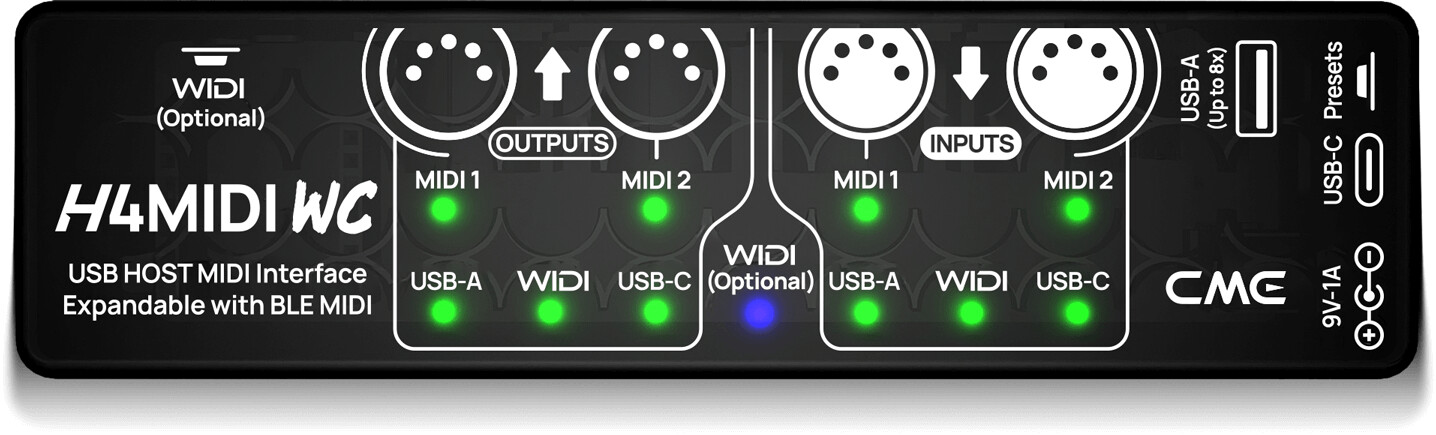
Add power to the barrel connector, connect USB-C to the MM and connect
up to 8 USB-Midii Devices and 4 DIN + Filtering and Routing and optional BLE
Oh and it´s only around 60€
2 Likes
Thanks, I will try it if nothing else helps! The really puzzling thing is that this guy on youtube made his Intech knob controller work with MM via direct USB connection. https://youtu.be/TkJODQF6yLc?t=485
For me the cool thing is, that you can plug any standard usb hub into the H4MIDIWC.
Oh and btw, there is even a smaller sister with usb host but only 2 DIN for around 40 bucks.
1 Like
My Intech controllers work perfectly with the Metamodule. I have 6 of them off a single usb cable. A mix of button, knob and fader units (with the old style buttons not the nice new ones).
How is the controller configured? What sort of midi messages are you expecting it to send? Can you confirm the expected midi data comes out when plugged into the computer?
1 Like
I just tested an Intech EF44 with my MM and same as @khimbo, nothing is happening on the MM when I try to link a control from the EF44 to a parameter on the MM. The EF44 works fine when plugged into my computer or into a MIDI host box. I’ve tested the MM today with a midi controller (an old Beatstep) and that communicated fine with the MM.
Your setup is very similar to what I imagined to use with my MM. I bought the PO16 (16 pots) and started with the default config which sends normal MIDI cc on Ch1. My laptop receives the signal as it’s shown in the grid app (Ch1 CC 32-47) but the MM doesn’t react when I try to assign a pot to a knob.
How is your Intech setup configured? Is there any ‘global’ setting which I should set in a specific way? Could you maybe share your config file?
hmmmm, the default should definitely work. My controllers have a pretty crazy setup so sending you a full layout isn’t really going to help as I have all my grids interacting with each other. I can’t upload a json here but if you save the following as a .json file in your grid-userdata/configs and apply this to any pot it should work and output data to the mm
{
    "id": "05d1b485-a4ba-4094-8cb1-f0313e380b4b",
    "modifiedAt": "2025-12-09T11:23:35.469Z",
    "name": "TestPot",
    "description": "Click here to add description",
    "type": "potmeter",
    "version": {
        "major": "1",
        "minor": "6",
        "patch": "1-nightly"
    },
    "configType": "preset",
    "configs": {
        "events": [
            {
                "event": 0,
                "config": "--[[@l]] local num,val,r,g,b=self:ind(),self:pva(),255,0,0--[[@glc]] glc(num,1,r,g,b,0)--[[@glp]] glp(num,1,val)"
            },
            {
                "event": 1,
                "config": "--[[@l]] local num,val,ch,cc=self:ind(),self:pva(),(gmy()*4+gpc())%16,73--[[@gms]] gms(ch,176,cc,val)--[[@glp]] glp(num,1,val)"
            },
            {
                "event": 6,
                "config": "--[[@cb]] print('tick')"
            }
        ]
    },
    "createdAt": "2025-12-09T11:23:35.468Z",
    "virtualPath": "",
    "cloudId": "TSm0i8Rpwk5ZPR3VckFg",
    "owner": "s7dYOXFQRKb0HLB9W2injuKdjNF2"
}
What version of the firmware are you using? In my experience Intech break something every time they push a firmware update (which has been a massive source of frustration tbh and one of the reasons I would not recommend these devices to people). I’m on 1.4.1 (editor is 1.6.1-nightly as per the json but the hardware is shown as 1.4.1 in the editor). Might be worth rolling back to that version and testing it?
1 Like