PERCALL - Bugs on choke function

Hi there,

I tried the Noise Plethora into Percall patch today.

I had 2 differents bugs related to the choke function :

  1. on both of them when I engage them I couldn’t switch them off (the choke buttons moves / even after swaping & reloading the patch)
  2. Choke 1>2 : chokes well channel 2 regarding the decay length of channel 1
    Choke 3>4 : channel 3 chokes “some” triggers" of channel 4 but is not related to decay length.

I attach the patch here
PLETHORA PERCALL.yml (6.4 KB)

i’m on FW 2.1.2

Thanks for your feedback !

Best

@hemmer might be able to check on this?

2 Likes

Can take a look, before I do I assume it works as you expect in VCV?

1 Like

Hi,

I have just tried out and it works fin in VCV.

Here is a simple VCV patch :
VCV PLETHORA PERCALL - CHOKE.vcv (1.6 KB)

Thanks!

Hi Hemmer,

Did you have a chance to have a look?

Thanks!

Hi there,

I’ve just checked and cannot reproduce either. I don’t 100% understand 1. but:

  1. choke can turn on and off for 1&2 and 3&4, the visual state and behaviour matches VCV and my expectations
  2. both 1&2 and 3&4 choke every time a new trigger comes in. to test i’m feeding a gate and a slightly delayed gate and plotting envelopes from 3 & 4 and 4 is choked every time 3 triggers.

Hi @hemmer,

Thank you for your feedback.
I still have the bug = Choke function is always ON no matter the position of the Choke control.

I recorded 2 videos showing the behaviour : 1 for channel 1>2 and the other for channel 3>4
4MS META - PERCALL CHOKE - Google Drive

I don’t understand this behavior

Did you try with the patch I uploaded?
Anyone else having trouble with choke control?

Yes I used your patch to check (needed to re-map outputs). One possible thing is the gates/triggers your sending might not be always sufficient somehow. Could you rule out by sending gates from a reliable LFO within the yml/patch to check?

Good evening Hemmer,

I tried both with :

  • 2 x square LFO
  • 2 x euclidean circles
    And same behaviour, the choke function is always ON.

I added 2 videos in the Drive : 4MS META - PERCALL CHOKE - Google Drive

Have a good evening

Hi,

Am I the only one experiencing this ?
Would be nice to have some feedback as it’s a useful module

Yeah would be good to get confirmation as I can’t seem to reproduce at all. One of my favourite modules IRL!

1 Like

You saw the problem in my videos with the choke function not going off?

I use the last META FW (2.1.7) and Plugins so it should be the same behaviour for other users.
Or I might soon going to be unable to stop choking :wink:

Thank you @hemmer for your follow up on this, I so want to use it !!!

Just so you don’t think I’m fobbing you off :sweat_smile:, here’s a video with me doing the same thing in VCV and MM. https://drive.google.com/file/d/1eHkF-cv4t65x7S1LFjAGfAJPi3KuPrSj/view?usp=sharing

Sound isn’t great, but at the end you can see the channel 3 (yellow) clearly choking the channel 4 blue when the setting is toggled on and off.

Start is same behaviour in VCV.

Firmware v2.1.3

Hi @hemmer,

Thanks a lot for taking time to do and upload a video.
The video was essential to identify the bug so thanks!

here the video : 4MS META - PERCALL CHOKE - Google Drive

The choke function ON/OFF works when you adjust that parameter in the menu (as you did) but NOT when it’s mapped to any of the meta knob.
I tried assigning to midi and it works fine.

Would it be possible to make it work with the meta knobs?

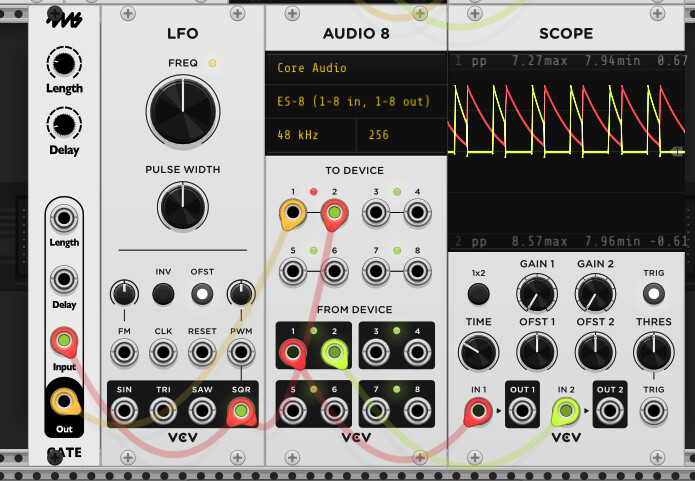
Unrelated question : how did you do to connect the meta to your screen ?
Have a great day

For me, the knobs also work but you need to be left or right of noon (0.5) to change it? I notice that Percall is a rare case where I haven’t used configSwitch (uses configParam instead), just for historic reasons - I suspect that MM handles explicit switches more naturally. I’ve opened a PR to fix: Update Befaco submodule to fix Percall choke switch by hemmer · Pull Request #547 · 4ms/metamodule · GitHub

1 Like

I use an expert sleepers es-8, but any DC coupled audio interface should do the trick!

1 Like

Thanks a lot !:folded_hands:t2:

Ok I get it !
I thought you could mirror the meta screen on another screen :sweat_smile: