Firmware v2.3.0 is out and has a lot of safety features under the hood. But there’s one shiny new feature that’s been requested since day one: USB MIDI device mode!
You can now connect your MetaModule to a computer and use it as a MIDI device.
You can also select to screen-cast the display to any webcam program on your computer such as OBS studio.
And another feature requested since the beginning is a splash screen at power on. Finally, we did that.
Behind the scenes, the dynamic memory system for plugins has been re-written so that we can recover from crashes due to running out of memory and misbehaving modules. Most of the time, instead of freezing, the MetaModule will pop up a notification telling you what plugin broke or ran out of memory and let you try something else.
Also, the SDK version has been bumped up to v2.3.
New USB and MIDI Features
USB Device mode: In the Preferences, select function as a USB Device, or Host, or auto-detect host/device.
MIDI Device mode: Can connect to a computer as a MIDI Device.
UVC Video device: Can function as a webcam device to mirror the screen to a computer.
Console device: Can function as a CDC console for debugging or reading logs
Compatibility with more MIDI devices (detect certain non-compliant USB devices and workaround their limitations in an attempt to connect).
SDK API for USB and USB-MIDI queries: modules can query the USB connection status, and probe into available USB MIDI jacks and cables.
Crash protection
Memory allocation system refactored in order to recover when plugins run out of memory or crash
Firmware runs with c++ exceptions enabled
All firmware allocations that might result in out-of-memory are caught and reported to the user, without crashing.
Plugin heap is separate from firmware heap, so a plugin can safely be removed without crashing the firmware.
Plugins that throw an exception (e.g. out of memory) can catch their own exception and clean up or try something different.
Plugins that crash can often be recovered by firmware
Other improvements
Firmware is self-extracting (smaller binary, updates faster)
Splash screen while firmware is booting and extracting
No. I started doing this at first, but the UVC video takes up so much bandwidth, you drop MIDI packets easily (even worse if you add in SD card and Wi-Fi access).
You can of course do DIN5 or TRS MIDI and Video at the same time when the MIDI Expander is out (first proto is here, writing firmware for it now…)
Updated yesterday, I now get “plugin crashed while initializing” when it gets to 4MS-ROMplers (or maybe the one before it which I can’t read as the error comes up).
I have it set to load all plugins on startup, and the error occurs with an existing patch which does contain the SeeArr ROMpler, and also a totally blank patch with no modules, set to starting patch.
That sounds like you’re running out of memory. We’ve now hit the threshold where loading all plugins at startup uses more memory than we have available, so it’s not possible anymore. For me, if I load all plugins alphabetically, it fails at UnfilteredVolume1. But if I don’t preload anything, and then manually load UnfilteredVolume1 first, then click Load All, I can get them all to load. But rather than trying to play tetris to fit them all in, it’s better to pick a small number of plugins to pre-load. And/or use the auto-load feature to just load on demand.
I would suggest removing as many plugins from your Pre-load list as you can, or just hand-pick a handful that you know you need each session and pre-load just those few. Then use the autoload feature (Prefs > Missing Plugins > Always or Ask) to load plugins on demand when you open a patch.
You could get to the bottom of it and don’t pre-load any plugins (boot up with no SD card or USB drive inserted). Make sure auto-load is turned on. Then load the patch with the SeeArr ROMpler. This will make it just load the plugins needed for that patch. If it works, then that shows its a combination of all the plugins running out of room, and not a crashing bug in one of the plugins.
I’m about to release v2.3.0 of the 4ms-maintained plugins, which use the new SDK and report a more informative message, but the memory limits are the same.
I just received my meta module yesterday. Today is the it day I was able to do anything with it and I ran across this issue. I will try these steps. Thank you!
It’s unlikely, as I understand the VCV HOST plugin pack is not open-source. The owner of that plugin (VCV, I believe?) would need to port it to MetaModule.
The MIDI-GATE module works on MetaModule, if you’re just trying to get MIDI notes to send gates.
Probably be out around the end of the year? The first proto worked well.
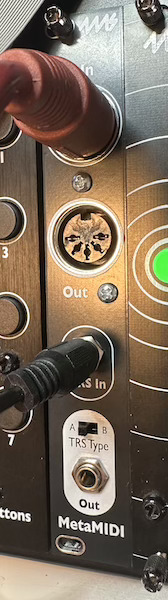
It’s got a DIN5 input, DIN5 output, and a TRS input and TRS output (with an A/B wiring switch for the TRS output jack – the TRS input jack works with either wiring).
Each of the ports (TRS, DIN5, and USB) is a separate stream, and you can set up filters much like you can filter by MIDI Channel. So for example you can make a patch that receives clock only from the DIN5 Input, and routes notes from USB to one VCO and notes from the TRS input to a different VCO.
All MIDI mappings default to listening to all ports, so the patch will work whether you play into the USB jack or the DIN5 jack. You can also route outputs to any of the three MIDI ports, the default is USB.
This is all working pretty well. I’m adding USB cable support in device mode so that a computer can see the three ports.(edit: decided not to do this – USB traffic stays on the USB port)
amazing update. Setting Meta Module to USB Device mode and connecting it to my computer. Doesn’t appear as a midi device in ableton though. What am i missing?
I wondered if this new MIDI device update, combined with the recent ability for MIDI PC patch loading (documented here: Load & autoplay patches via midi - Feature Requst), together now means that patch changes on MetaModule could be automated from within a DAW on the computer?
 crash protection is HUUUGE!