I would like to map in VCV rack a bunch of MIDI CC’s. So adding these in Metamodule would make it a lot easier to build in VCV rack.
3 Likes
+1 for this — also, allowing us to set MIDI channels in VCV for the MIDI modules already in RackCore.
If I understand, doesn’t this work already? I’ve been mapping MIDI to the MetaModule in VCV Rack for a while now.
@etcetc How are you doing that?
This is already working. Simply use any of VCV’s MIDI modules and it will automatically transfer over into MM when you load your patch. The MIDI modules will disappear when you load it in MM but the mappings will all remain. Check out this video example: https://www.youtube.com/watch?v=kFZ1_DstqDc
2 Likes
Oh wow! That’s great, thanks.
Hmm … I just tried it with this simple patch:
MIDI Test.vcv (1.3 KB)
I’ve connected three modules to MIDI devices set to different channels, and only one of those MIDI connections makes it into the yml file:
MIDI Test.yml (1.4 KB)
Am I doing something wrong here?
Also flagging that the one connection that does carry over to the MetaModule isn’t respecting the MIDI channel assignment in VCV — it’s responding to gates on any MIDI channel. So yeah, @kira4ms I think I was right that setting MIDI channels in VCV for use on the Meta still isn’t possible?
Following as I also have been unable to get this to happen. Is there a documented happy path?
Yeah, the MetaModule Hub only expects to find one MIDI->CV module. I think I could add support for multiple MIDI->CV modules because otherwise you can’t use more than one MIDI channel at a time in a patch.
I’m not sure why the channel is not being exported-- that’s a bug. It’s supposed to since v2.0.12. I’ll look at it
Update: OK, I see the bug. It only records the MIDI channel if there’s a Split module after the MIDI->CV module. I’ll fix it.
3 Likes
Thanks! Yeah, being able to use multiple MIDI > CV modules is pretty essential for using the Meta with polysequencers like the Oxi One.
1 Like
Amazing, thank you for sharing how to add MIDI mappings to the patch in VCV. Didn’t realise that the mappings would just translate to the MM, I always did them purely on the module. This will save a lot of time!
Just wanted to check here - am I right that there’s no way of editing the scaling of the mapping within VCV? (so that MIDI CC moves the knob only from 0-50% for example)
Bumping this thread — it would be really helpful to be able to set multiple MIDI channels and CCs in VCV Rack rather than having to do it on the Meta every time. This is exactly the kind of patching situation where you have a ton of connections and multiple copies of the same module and it’s easy to lose track when patching on the Meta.
3 Likes
I thought this was working? Maybe I misunderstood it. Here’s a patch I made that sends gates out of Out jacks 1 - 4 whenever it receives a MIDI note on MIDI channels 1 - 4, respectively.
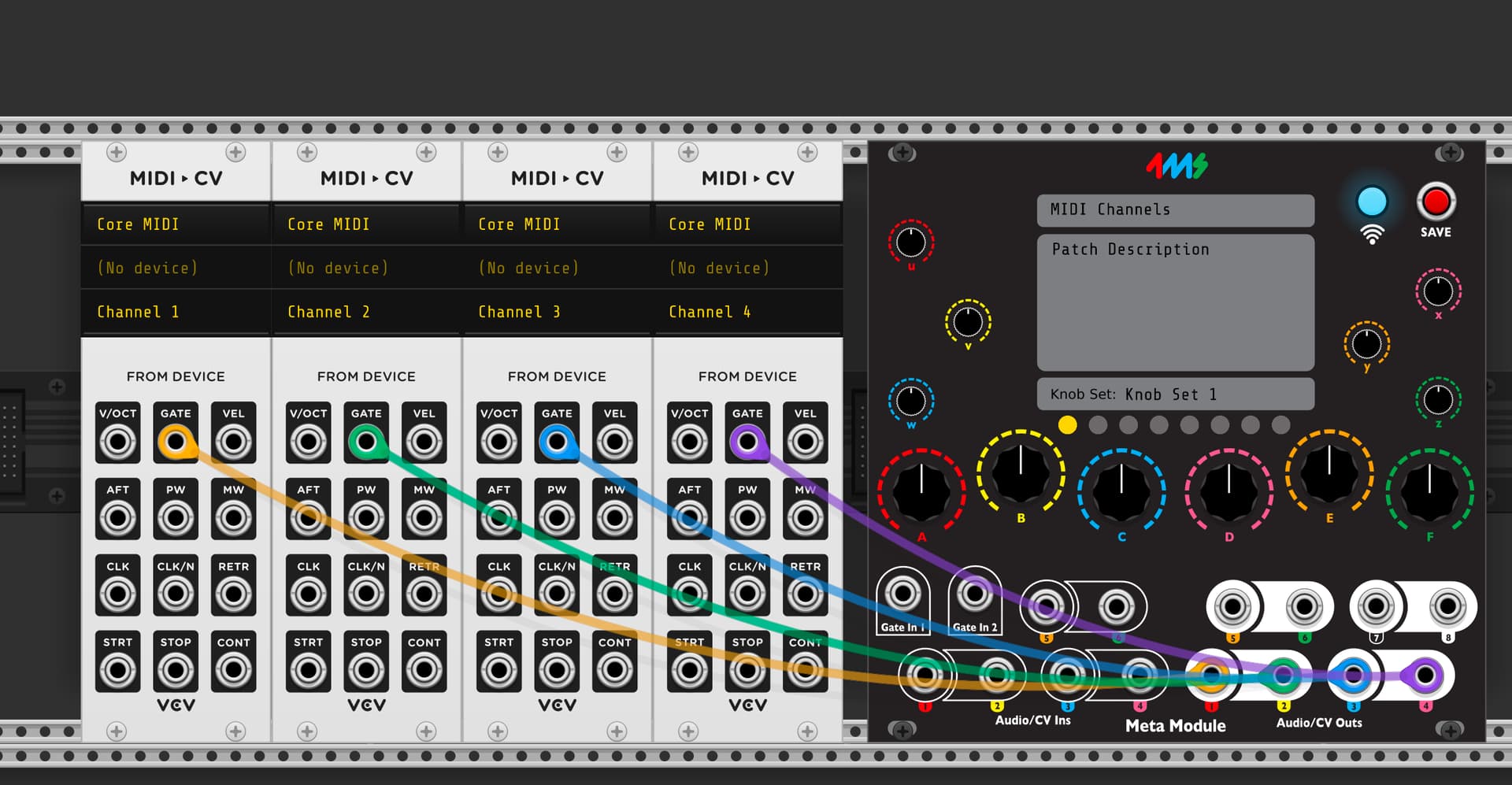
Let me know what I missed
Edit: I tried the MIDI Test.yml patch above (with drums mapped to each output) and it works also.
Hey Dan, happy new year!
Did you make that patch in VCV Rack or on the MM? The issue for me is that there isn’t (or wasn’t?) a way to create that kind of multichannel patch in VCV, and it’s the kind of thing that can be fiddly to do on the module.
I made it in VCV, then sent it to the MM via Wi-Fi. It seems to work as expected. Also the MIDI Test.vcv patch you posted back in June worked when I opened it in VCV and re-sent it to my MM (but I presume the MIDI Test.yml file would not work since it was created before I fixed the bug)
Oh wow! I guess this got fixed without me noticing. I’ll test this afternoon. Many thanks and sorry for the confusion.
No problem, let me know if it works!
It does! (After a firmware update.) Fantastic, thank you!
PSA: This makes the Meta Module and the Oxi One an incredible combination.
1 Like
I also am porting the “CV To MIDI CC” to the RackCore built-in modules. Here is the firmware version release candidate that has it (as well as the Scope module as a built-in):
https://github.com/4ms/metamodule/releases/download/firmware-v2.1.10-rc2/metamodule-firmware-v2.1.10-rc2-firmware-assets.zip
3 Likes